


TL;DR
- Apple’s App Store pages capture significant traffic: 311K clicks for Instagram’s page, 1.2K+ per editorial story in 28 days.
- This traffic is invisible in App Store Connect and Google Search Console—only third-party tools can track it.
- Your app gets discovered via Google and AI engines when featured in Apple’s curation.
- Learn the tracking tools, monitoring methods, and content strategies to capitalize on this new discovery channel.
After 17 years, Apple opened the App Store to the web. Editorial stories, top charts, collections, and in-app events are now fully crawlable and indexable by Google.
If you’re managing ASO for an app, this fundamentally changes your discovery strategy. Your app’s visibility now extends beyond the App Store into web search and AI answer engines. The urgent questions: How do we track this new channel? How do we optimize for it? And what does integrated ASO/SEO/GEO strategy actually look like?
This guide provides practical tracking methods and a strategic framework for app marketers navigating this expanded discovery landscape.
What Actually Changed (and Why It Matters for App Discovery)
Product pages from apps.apple.com have been indexed for years. This expansion is fundamentally different.
What’s new: Editorial stories now have their own indexable pages. Top charts are structured and crawlable. Collections live as standalone URLs. In-app events have dedicated web pages. All of it is connected through Apple’s internal linking structure, distributing domain authority across the entire ecosystem.
Why now? Three forces converged. Regulatory pressure—particularly Europe’s Digital Markets Act—forced Apple to open its ecosystem. Competition intensified as Epic Games launched alternative app stores. In addition AI-driven discovery demanded that Apple’s content become accessible to LLMs and answer engines. The App Store had to become part of the open web.
The result: Apple’s editorial content is now a permanent fixture in search results. And it’s winning.
This represents a fundamental shift in the relationship between ASO vs SEO. The distinction just collapsed.
The Data: What’s Actually Ranking
Here’s what makes this different from typical App Store optimization: the scale of web search traffic is already significant.
Product pages for major apps are capturing hundreds of thousands of organic clicks monthly—Instagram’s App Store page alone saw 311K clicks in 28 days. But what’s more interesting for app marketers is the performance of editorial content:
Apple’s story pages—like “Best nutrition tracking apps”—are driving 1.2K+ clicks from web search.

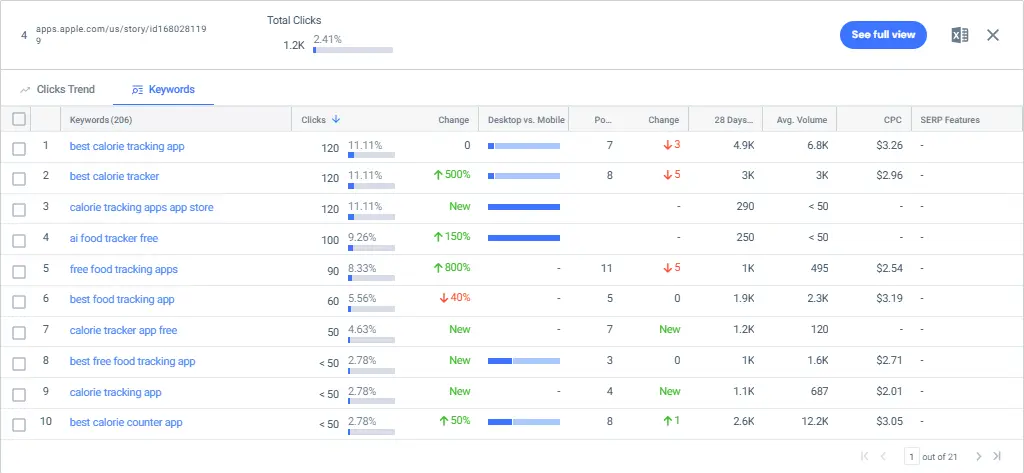
Chart pages pull even more: the ipad best word apps chart page captured 1.3K clicks in the same period. This isn’t niche traffic; it’s a meaningful discovery channel.


The strategic insight: If your app appears in these stories or charts, you’re getting organic discovery through a channel you can’t directly control or measure with first-party data. As detailed in Neo Ads’ comprehensive analysis, this creates entirely new discovery paths across search engines and AI platforms—paths that didn’t exist before Apple’s web expansion.
This is why tracking becomes critical. You need to understand which Apple pages feature your app and how much traffic they’re capturing, even though this data won’t appear in your Analytics or App Store Connect.
Real SERP Impact: Where Apple Is Winning
Let’s see an example: Search “best action games on iphone”, You’ll see that Apple’s story is all over AI Overview, showing 8 links from Apple – either collections or stories.

When we scroll further we see that the first organic result is also Apple’s link – ahead of reddit’s result that is based on user experience.

Why does this matter for app marketers? If your app appears in these stories, you’re getting organic discovery through a channel you can’t directly control or track with first-party data. Research from Ahrefs found that AI Overviews correlate with a 34.5% lower click-through rate for traditional results—but Apple’s pages still capture significant traffic.
The opportunity: Your app can now be discovered through web search and AI engines, not just App Store search. The challenge: You need new tools and strategies to track and optimize for this expanded ecosystem.
How to Track App Store Web Performance
The App Store web expansion creates a unique tracking blindspot—even for your own app.
Here’s the problem: Let’s say you’re a marketer at Canva and your app appears in Apple’s “Best Design Apps” story, that page drives traffic you can’t see in your first-party data. You don’t own apps.apple.com, so it won’t appear in your Google Search Console. App Store Connect doesn’t currently provide web referral breakdowns at this granular level (Maybe an update may come eventually?).
The only way to track this performance (for now) is through third-party competitive intelligence tools.
This means tracking App Store pages isn’t just about competitive analysis—it’s also about understanding your own app’s discovery ecosystem. You need visibility into:
- Which App Store pages rank for your target keywords
- Which stories or collections feature your app
- Traffic trends to these pages
- Keyword portfolios driving that traffic
What to Track (And How)
Your Competitive Keyword Audit
Start here: Pull your top 20-50 app-related keywords. Search each one manually and document:
- Does an App Store page appear? (Yes/No)
- What type? (Story, Chart, Product Page)
- What position? (Top 3, 4-10, in AI Overview)
- Changes over time (monthly checks)
Build a simple tracking spreadsheet. This is your baseline for understanding SERP composition shifts.
App Store URL Performance
Identify the specific story, chart, and product pages in your category. Track their organic traffic trends using whatever competitive tool you have access to. Monitor which keywords drive traffic to these pages. Watch for new stories or collections launching in your space—Apple regularly updates editorial content.
Key Metrics That Matter
- SERP penetration rate: What percentage of your target keywords now show App Store results? If it’s over 50%, you need to reprioritize immediately.
- Position trends: Are App Store pages moving up or down over time? Stable positions indicate strong, entrenched rankings that will be difficult to displace.
- Traffic correlation: Did your organic traffic drop when App Store pages appeared for your core keywords? Quantify the impact to understand the business implications.
- AI Overview appearances: Which queries show Apple content in AI-generated summaries? These are especially difficult to reclaim since studies show AI Overviews can reduce clicks by over 34%.
Practical Setup:
- Start with 10-20 core keywords, not 500
- Check weekly for the first month to understand volatility
- Shift to monthly monitoring once patterns emerge
- Quarterly strategic reviews to adjust content direction
This aligns with proven frameworks for measuring marketing performance with KPIs—start focused, track what matters, iterate based on data.
Finding Your Keyword Opportunities
Reverse engineer Apple’s coverage. What do their stories actually target? Generic, high-volume queries: “best fitness apps,” “top productivity apps,” “essential iPhone apps.”
Identify gaps: Keywords without App Store presence yet. Categories Apple hasn’t created stories for. Emerging app types or new use cases.
Look for long-tail variations Apple’s generic content can’t address. Their stories cover broad categories. Your content can target specific problems: “best fitness apps for home workouts,” “productivity apps that work offline,” “iPhone apps for freelance designers.”
Find differentiation angles where your content adds unique value:
- Specific use cases Apple doesn’t cover
- Platform comparisons (iOS vs Android, free vs paid)
- In-depth reviews with personal testing and screenshots
- Problem-solution framing vs. Apple’s list format
- Timely content (“best new apps in 2025”) vs. evergreen curation
Reality check: If Apple has a story for “best fitness apps,” you’re not outranking them for that exact query. Find adjacent opportunities instead. That’s where your ROI lives now.
Strategic Implications for App Marketers
Your App’s Discovery Ecosystem Just Expanded
If you’re managing ASO for Canva, Duolingo, or any app, your discovery strategy can no longer stop at App Store optimization. Here’s what changed:
- Web search is now a discovery channel. When your app appears in Apple’s editorial stories, collections, or charts, it gets discovered through Google search. Users searching “best design apps” might find Apple’s story featuring your app—even if they weren’t initially looking in the App Store. They still need to download through the App Store, but the discovery could happen on the web.
- AI engines cite your app. ChatGPT, Perplexity, and Google’s AI Overviews pull from Apple’s structured content. When they answer “what’s the best language learning app,” they’re citing Apple’s editorial curation—which might include your app.
- You need new optimization tactics. Getting featured in Apple’s stories and collections isn’t just ASO anymore—it’s also about driving traffic from web to app and optimizing for AI discovery. Your app’s discoverability now depends on Apple’s editorial decisions about web-accessible content.
Create Supporting Content Around Apple’s Curation
If your app has been featured in Apple’s stories or collections, you have a content opportunity most brands are missing.
The strategy: Create blog content that complements and supports the Apple pages featuring your app. If your productivity app appears in Apple’s “Best Productivity Apps” story, create content like:
- “How to choose the right productivity app for remote teams”
- “5 ways productivity apps fail (and how to avoid them)”
- Case studies showing real results from productivity app users
- Comparison guides that position your category (and your app) as the solution
Why this works:
- You rank for related long-tail queries Apple doesn’t target
- You build topical authority in your app category
- You capture users earlier in their discovery journey
- You reinforce your brand when users find Apple’s list
- You own the narrative with depth Apple’s curation doesn’t provide
The traffic opportunity: Apple’s “Best nutrition tracking apps” story captured 1.2K clicks in the 28 days in the US according to SimilarWeb. Related long-tail content like “best nutrition tracking apps for diabetes management” or “how nutrition tracking apps help with meal planning” can capture additional search volume while positioning your brand as the expert—not just another app in a list.
This isn’t about competing with Apple’s pages—it’s about building a content ecosystem around the discovery paths Apple created.
What This Means for Your Strategy
- Monitor where your app appears: Track which stories, collections, and charts feature your app. These are now organic discovery channels you need to understand and potentially influence through App Store optimization and relationships with Apple’s editorial team.
- Track the impact: Use competitive intelligence tools to see traffic flowing to pages featuring your app. Product pages like Instagram (311K clicks) and Google Maps (163K clicks) show the scale of organic search volume flowing through App Store web pages—even if you can’t see this in first-party data.
- Integrate your teams: ASO, SEO, and GEO can no longer operate separately. The user journey now spans App Store search, web search, and AI answer engines. Your teams need shared metrics that track discovery across all three channels.
This is the evolution of SEO applied to apps—search is answer-driven, discovery is multi-channel, and optimization requires understanding the complete ecosystem.
A Note for Content Marketers
If you create “best apps” content or app comparison articles, your competitive landscape has shifted. Apple’s editorial pages dominate generic queries like “best [category] apps.” Focus on differentiated angles: specific use cases, detailed reviews with personal testing, platform comparisons, or problem-solution content Apple’s lists don’t address. You can’t beat Apple’s domain authority on their own products—but you can provide value they don’t.
What to Do Now (Prioritized for App Marketers)
If You Have 5 Hours This Month
Priority 1: Audit where your app appears (2 hours)
- Search manually for “[your app category] apps” queries
- Document whether your app appears in Apple stories, charts, or collections
- Screenshot these appearances for tracking
- Identify which keywords trigger these pages
Priority 2: Set up monitoring (1 hour)
- Add 5 key App Store story/chart URLs to your competitive intelligence tool
- Create a tracking spreadsheet if you don’t have access to paid tools
- Set monthly calendar reminders
Priority 3: Quantify the opportunity (2 hours)
- Use SimilarWeb or similar tools to estimate traffic to pages featuring your app
- Compare this to your direct App Store traffic
For ASO/SEO Teams: The 90-Day Integration Plan
Month 1: Assessment
- Full audit: Where does your app appear in Apple’s web ecosystem?
- Traffic analysis: What’s the potential reach of these placements?
- Team alignment: Get ASO and SEO teams sharing data and metrics
- Stakeholder briefing: Explain why ASO, SEO, and GEO must be integrated
Months 2-3: Implementation
- Build unified tracking dashboard across App Store, web search, and AI discovery
- Align keyword strategies across ASO and SEO efforts
- Test optimizations that increase chances of editorial features
- Measure and refine based on actual performance data
This aligns with measuring marketing performance across the complete discovery funnel.
Frequently Asked Questions
App Store traffic comes from users browsing Apple’s native App Store app on iOS devices. App Store web traffic comes from users discovering your app through Google search, AI engines, or web browsers on apps.apple.com pages. The key difference: web traffic is discovery-only—users still need to download through the App Store app, but your visibility now extends far beyond people actively browsing the App Store.
Yes, you can create supporting blog content targeting long-tail variations Apple doesn’t cover. If you’re featured in “Best Productivity Apps,” write about “best productivity apps for remote teams” or “how to choose productivity apps for freelancers.” This builds topical authority, captures users earlier in discovery, and positions your brand as the expert—not just another app in a list.
Yes. ChatGPT, Perplexity, and Google’s AI Overviews pull from Apple’s editorial content when answering app-related queries. If your app appears in Apple’s curated stories or collections, you’re getting discovery through AI answer engines—a growing channel as users increasingly skip traditional search and go straight to AI for recommendations.
Conclusion
Apple’s App Store web expansion isn’t temporary—it’s a permanent shift in how apps get discovered. Your app’s visibility now extends beyond App Store search into web search and AI answer engines.
App marketers who integrate ASO, SEO, and GEO now—as one unified discovery strategy—will capture this expanded opportunity. Those keeping them separate will miss a significant acquisition channel.
Start with tracking: Understand where your app appears in Apple’s web ecosystem and quantify the traffic opportunity. Then build an integrated strategy that optimizes across all three discovery channels.
Ready to adapt? At YellowHEAD, we’ve integrated ASO, SEO, and GEO into unified discovery optimization. Contact us to navigate this new landscape.
Disclaimer: The data is from Similarweb – Between the 18th of October until the 14th of November, in the US Only. (Desktop & Mobile combined)


